


ODOO'S FUNCTION
Odoo Expenses streamlines the management of expenses. After an employee submits their expenses in Odoo, the expenses are reviewed by management and accounting teams. Once approved, payments can then be processed and disbursed back to the employee for reimbursement(s).
CLUEDOO'S FUNCTION
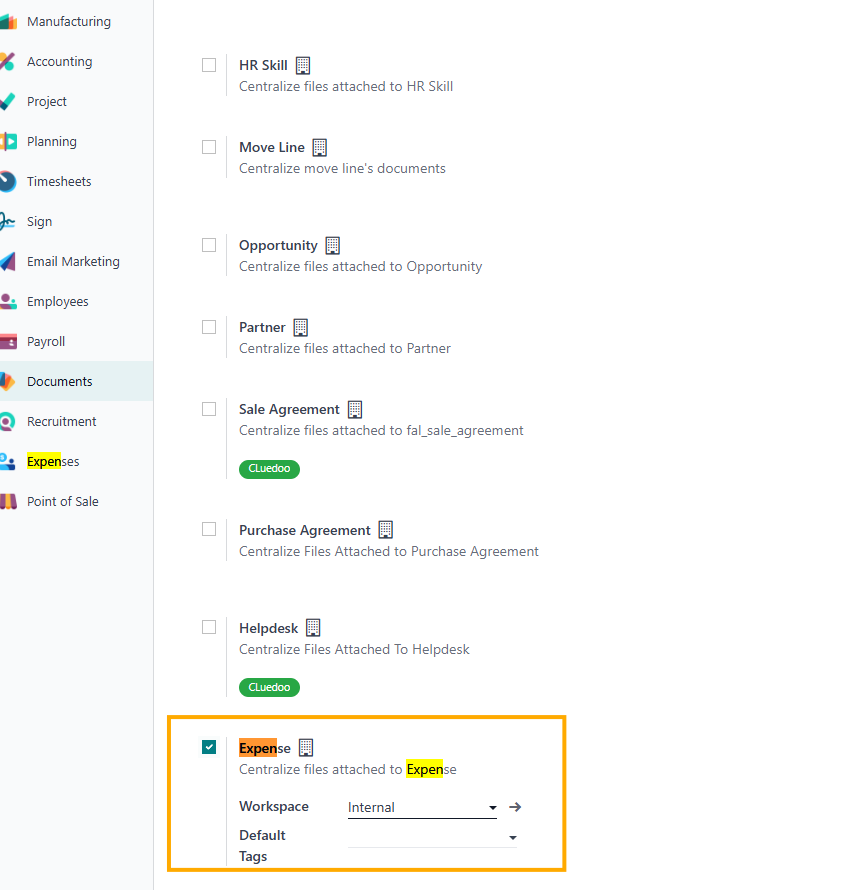
Cluedoo extends this feature and lets you add all the document of Expense on Document
1. On Settings > Documents > Tick Expenses > Workspace |
|
2. Create new Expenses or choose expenses with status is: To submit > Choose Attach Receipt > Choose file to attach. You can also attach file with attachment button from chatter |
|
3. Make sure that your file was attached. |
|
4. Go to Documents
to check if the file was sync |
|